
 Home — Continuous Improvement Tools
Process Improvement Tools.
Standard Work.
Work Instructions.
Flow Chart templates.
Swim Lane Cross Functional Flowchart.
Value Stream Mapping.
Lean tools.
Yamazumi Chart template.
Time Study templates.
DMAIC tools.
Quality Improvement tools.
House of Quality QFD.
FMEA Risk Reduction.
Root Cause Analysis tools.
Problem Solving tools.
OEE.
Preventive Maintenance.
Skip to main content

















Installation and Setup
Installation - Each User. Installation - Multi-user. Language Translations. Personalize Your Templates.Systems2win Training.
Quick Start Initial Training. New User Training. Training Matrix. Systems2win Leadership. Training Classes.Lean Training
Lean Training and Coaching. Lean Principles. Muda 8 Wastes. Goal - Lean Flow. Roadmap - Lean Journey. Value Stream Mapping. Standard Work. Hansei Lean Thinking. Lean Dictionary. Online Lean Training. Lean Leadership.Microsoft Office Training
Excel Training. Excel Drawings (without Visio). Excel Charts. Word Training. PDF Training. Document Storage and Naming.Support
Support.Brainstorming Techniques
to use your Brainstorming template and other brainstorming tools
Purpose of Brainstorming Tools
Use brainstorming to generate a large number of ideas in a short amount of time.
Use your brainstorming template to do it consistently
(and to manage others to do it consistently)
The Standard Brainstorming Process
Review how to do brainstorming
- Review the (general) Brainstorming Rules
- Review any special alternative brainstorming techniques that will be used in this session
Brainstorming Rules
- Suspend judgment. There are no stupid ideas.
The craziest ideas sometimes spawn the seeds of the best ideas.- No criticism, or evaluation, or discussion of ideas as they are being generated
- Every idea is written down
- Encourage piggybacking of other ideas — to modify, combine, expound, reverse...
Clearly state the question or problem
that you are seeking to resolve often phrased with why, how, or what
(A problem well defined is a problem half solved, right?)
Like all Systems2win Word templates, the "placeholder" instructional text disappears when your start typing over it.
Learn more about Form Fields.
Agree upon Objectives
Most disagreements come from seeking to optimize different objectives.
Example: Your idea optimizes time-savings, but I'm trying to optimize quality.
No wonder we don't agree on the best way to solve our problem...
Allow time to think
Allow at least a few minutes to think, ponder, and reflect on the question
Encourage people to return (again and again) to the Hansei questions to stimulate Lean Thinking.
Facilitate brainstorming

- Follow the agreed-upon rules.
- Suspend judgment. No discussion or debate. Just ideas.
- Encourage piggyback ideas and radical ideas.
- Write ideas exactly as they are stated. (Can clarify later.)
Optional: Nominal Group Technique (NGT)
To encourage contributions from everyone — each team member contributes one idea at a time
(perhaps with no discussion at all — not even clarification questions)
A member may 'pass', but will again be asked the next time it is his or her turn.
Keep going until all members pass — or for a specified amount of time.
Clarify
When brainstorming is done...
Ask for clarifications (from the person that suggested the idea), and perhaps rephrase some ideas more clearly
being careful to ensure that the rephrased idea still accurately reflects the originator's intended thought
Reduce the List
List reduction
- Display the entire list of brainstormed items so that everyone can see the complete list.
- For each item, ask, "Should this continue to be considered?"
If majority votes "no", mark that item in brackets.After all items have been voted on, ask...
"Does anyone want to put any bracketed item back on the list?"Even a single person can keep the item on the list. Cross off all other bracketed items.
- Combine ideas that are similar or complimentary.

Perhaps systematically comparing each item to every other item, but more commonly, using a less systematic, intuitive approach.
- Optionally perform Criteria Filtering or other advanced list reduction methods as described in our online training for decision making techniques
- Optionally use your Values List or Prioritization Matrix templates to reduce your list
Optional: Organize ideas into 'Affinity Group' categories
Also known as Affinity Diagram
This can be done before and/or after reducing the list.
Tip: Even if you did your original brainstorming on paper — this is where it is often "worth it" to transcribe your ideas to your Systems2win Brainstorming Worksheet — to make editing & organizing much easier.
Brainstorming.docx
is a Word template
(not Excel)
- Show the Navigation Pane: Home > Navigation Pane This will open a sidebar collapsible menu in the left sidebar that makes viewing affinity groups easier. This brainstorming template has been designed so that ideas should be documented using Style Heading 3, which will appear within the collapsible Document Map. If any ideas are somehow documented using Normal Style convert them to Heading 3. (Shortcut = CTRL+ALT+3)
- Facilitate consensus-building to cut and paste all Brainstorm Ideas into Affinity Group Headings
- Your goal is to identify patterns, overcome old paradigms, and stimulate fresh ideas so encourage new ideas to come up, and add them to your list
- Use your intuitive minds to allow Affinity Group category headings to emerge.
In addition, you might consider using...
Popular affinity group category headings
4 M's — (popular for manufacturing)
Man, Machine, Material, Methods
6 M's —
Machine, Method, Materials, Man, Measurement, Mother Nature
4 P's — (popular for service offerings)
People, Place/Plant, Policies, Procedures
8 P's —
Price, Promotion, People, Processes, Place/Plant, Policies, Procedures, Product
4 S's — (popular for service)
Surroundings, Suppliers, Systems, Skills
6 X's —
Equipment, Process, People, Materials, Environment, Management
4 I’s — System, Sub-system, and Component Interfaces:
Spatial (physically touching), Energy (transfer), Information (exchange), Material (exchange)
5 Pd’s — P-diagram design robustness noises:
Piece-to-piece, Customer usage and duty cycle, Degradation over time, Environment, Interactions with other systems (4I’s)
DOE (Design of Experiments)
Uncontrollable Factors, Controllable Factors, Blockable Nuisance Factors, Held-Constant Factors
- If an Affinity Group has only 1 or 2 items, perhaps it can be combined with another
- If an Affinity Group contains an overwhelming number of ideas, perhaps it can be divided further
Optional: Seek root causes
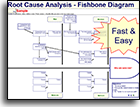
by transferring your data to a Root Cause Analysis template, a Fishbone Diagram, or other Root Cause Analysis Tools.
- Copy the ideas for each Affinity Group into a separate column in a blank Excel spreadsheet.
- Transcribe your ideas to your Root Cause Analysis template
Your Root Cause Analysis Fishbone template (RootCause.xlsx)
even has a special feature to Import your ideas into your fishbone diagram- Continue brainstorming ideas seeking deeper root causes by continuing to ask "Why?"
Agree upon solutions
Optionally take the time to rank ideas.
Perhaps give each person a specified number of votes.
(perhaps their vote for the top 5 ideas)
Just add an x next to each idea for each vote that it receives.
And then make your decision using any decision making tools or techniques.
Two popular ways to use your
Brainstorming template
1) Use a projector
to record ideas as they are generated directly on the Systems2win Brainstorming tool.
2) Write ideas on large paper
while an assistant uses your Brainstorming template to transcribe the results into a more legible version that can then...
- be used for easier editing and Affinity Grouping
- be electronically archived and emailed to participants after the meeting
Tip: Your Brainstorming.docx template is a Word template (not Excel)
Alternative Brainstorming Techniques
Root Cause Analysis
Follow the above instructions for standard brainstorming, but do your brainstorming right within your
Root Cause Analysis Mapping template
and keep brainstorming answers to the repeated question:
Why? Why? Why? Why? Why?
Round Robin Brainstorming
- Move around the room in sequential order
each person states an idea or has the option to 'pass'
- Keep going around the room until everyone passe.
Wildest Idea
When everyone is out of ideas, or imagination is running low,
start again, but this time allowing only outrageous ridiculous ideas.
Afterward see if some of these ideas might be modified into realistic possibilities.
Double Reversal
When everyone is out of ideas, or imagination is running low,
start again, but this time reverse the problem statement so that you're brainstorming ideas for how to make the problem worse.
Afterward, reverse each idea to see if any reversed ideas lead to new ideas that can now be added to the original brainstorming
(for how to make the problem better)
Affinity Diagram
Same as above...
but rather than using the Brainstorming template — use handwritten cards.
Using a thick marker pen, write each idea on a card or sticky note.
Randomly spread cards on large work surface where the team gathers round.
Without talking...
All team members participate to move cards into groups that seem related in some way. It's okay to move a card someone else has already placed. It's okay to make a second card for something that seems to belong in more than one group. It's okay for a card to be all alone.
When everyone seems done... talk.
Discuss the groups. Come up with a label for each group
(perhaps using a different colored card or ink)
Perhaps combine groups into larger groups, if appropriate
Brainwriting
Same as brainstorming... but no talking during the brainstorming phase.
Participants write one idea per card.
All cards are placed in the center of the table and shuffled.
Then follow the instructions for Affinity Diagram.
Training and Coaching
Consider Training and Coaching to support your teams to succeed
Schedule a Conference
Schedule a conference
to discuss your challenges
with an experienced lean advisor
Contents


150+ Templates
Try Some
Own Them All
Download Trial Now
Get a dozen trial templates,
and another dozen free gifts
@@@ Better conversion rate
if call to action is for a specific tool, and shows the image
Try It
Try this template
along with a couple dozen more
process improvement tools
Calls to Action Botttom
Related Topics
Related Topics section WITHOUT TESTIMONIALS
Replace this paragraph with menu library item for topics related to this video
Training and Coaching
Consider Training and Coaching to support your teams to succeed
Training to get you started.
Tools you won't outgrow.
Schedule a Conference
Schedule a conference
to discuss your challenges
with an experienced lean advisor