
 Home — Continuous Improvement Tools
Process Improvement Tools.
Standard Work.
Work Instructions.
Flow Chart templates.
Swim Lane Cross Functional Flowchart.
Value Stream Mapping.
Lean tools.
Yamazumi Chart template.
Time Study templates.
DMAIC tools.
Quality Improvement tools.
House of Quality QFD.
FMEA Risk Reduction.
Root Cause Analysis tools.
Problem Solving tools.
OEE.
Preventive Maintenance.
Skip to main content
























Installation and Setup
Installation - Each User. Installation - Multi-user. Language Translations. Personalize Your Templates.Systems2win Training.
Quick Start Initial Training. New User Training. Training Matrix. Systems2win Leadership. Training Classes.Lean Training
Lean Training and Coaching. Lean Principles. Muda 8 Wastes. Goal - Lean Flow. Roadmap - Lean Journey. Value Stream Mapping. Standard Work. Hansei Lean Thinking. Lean Dictionary. Online Lean Training. Lean Leadership.Microsoft Office Training
Excel Training. Excel Drawings (without Visio). Excel Charts. Word Training. PDF Training. Document Storage and Naming.Support
Support.FMEA template
FMEA tools for Failure Mode Effects Analysis
Why do we need an FMEA?
What could possibly go wrong?
Why FMEA?
Failure Mode and Effects Analysis is
a systematic way to anticipate problems, and to reduce risks
in both:
- Design of products and services, (DFMEA)
- and the Processes that make or deliver them (PFMEA)
New - Major Upgrade as of May 2019 !!!
with changes inspired by the new AIAG FMEA format
Sample FMEA example: FMEA form (download free trial)
FMEA Innovations
Before you start using your FMEA template, this video will introduce you to some important innovations.
In addition to this video, here is a written summary of these FMEA Innovations.
Tip: You will find more videos in the training sections below.
Not just one FMEA template
A full suite of DFSS tools
for all steps of the FMEA process

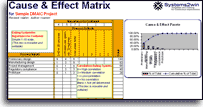



Learn more about each of the FMEA templates in your suites of DFSS Tools, DMAIC Tools, and Standard Work Tools
to help you better accomplish your FMEA goals - to deliver better quality, and reduce risks
Own all of these FMEA templates
to empower your teams
to delight your customers and avoid mistakes
How to find and open your
FMEA form
Find and open your FMEA template
Find and open your your FMEA template
(FMEA.xlsx)
in the same way that you find and open your other 150+ Systems2win templates.
If you don't yet own a license,
you can download your free trial now.
Save your working document
following the usual document storage and naming conventions established by your leaders — in order to avoid broken hyperlinks between related documents.
Open a Blank Sheet
When you're ready to start doing your own real work...
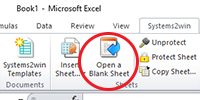
click the button to 'Open a Blank Sheet'
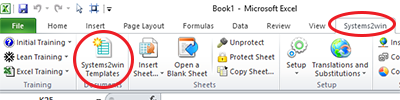
Excel Ribbon > Systems2win tab > Open a Blank Sheet
This blank sheet is where you will do your real work
(not on the Sample sheet — which gives you sample data that is extremely helpful for learning how to use your new tool, but is the wrong place to do your real work)
And then in the dialog window that appears, select which type of sheet to open:
- FMEA
If you choose this, then another dialog window will appear, to get further clarification of what type of FMEA. (see below)
- Process Flow Diagram
Before creating a PFMEA, you will usually first create (and analyze) a Process Flow Diagram to identify the desired deliverables and potential sources of variation that you will then analyze and manage in your PFMEA
You have the choice of using a stand-alone workbook for your Process Flow Diagram, or including it as a sheet within the same workbook with your PFMEA.
- Control Plan
After taking initial Corrective Actions prescribed in your PFMEA...

the next step is to use a Control Plan template to more diligently control product and process characteristics that have high chance of happening, and/or high severity consequences if they do happen.
You have the choice of using stand-alone workbooks for your Control Plans, or including them as sheets within the same workbook with your PFMEA.
It is not uncommon to have multiple sheets for Control Plans that differ for life cycle phases: Prototype, Pre-Launch, and Production.
If you chose 'FMEA', then in the next dialog window that appears, select:
- Type of FMEA:
Design FMEA or Process FMEA
- Data in Single Language or Multiple Languages
Learn more about features for multiple languages
Rename your new sheet
Optionally Change Language
If English is not your preferred language, then you can switch to your language, just like every Systems2win Excel template.
And the FMEA template also has a special feature so that you can also switch between languages for data (not just headers and help).
Optionally Hide Columns
You can hide optional columns that you know that you won't be using.
Not everyone uses the columns for ID, Filter, or the section for User-Defined fields.
You might also temporarily hide columns that you won't be using for a while.
The FMEA process has 7 phases. Some people prefer to temporarily hide columns for future phases - just to have a less cluttered work space.
As you begin using your
FMEA template
Don't skip the first 2 steps of...
The 7 Steps of FMEA
Step 1) Scope Definition
Video: FMEA Step 1
Training Video for the FMEA Process:
Step 1) Scope Definition
Process Improvement
Q and A
Ask us a question and see answers to common questions about process improvement.
Launch your team
Use the same tools and systems that you use to launch every continuous improvement team. Most commonly, you will use the button to Insert Sheets for:
- Team Charter
- A Project Plan (which might be a Gantt Summary Milestone Chart, Action List, To Do List, and/or a Bowling Chart)
And fill in your team members on the 'Team' sheet.
Learn Basic Excel Skills
This FMEA template is built on top of Microsoft Excel. If you are already familiar with Excel, then you're going to love being able to use everything that you already know.
All of the training on this page assumes that the Author of your FMEA template has already completed the (free) Systems2win New User Training, and the (free) self-paced online Excel training — to master foundational features and helpful tips for using Microsoft Excel.
Perhaps most importantly — don't use 'Insert Rows'. Instead, use the 'Add Rows' button in the Systems2win menu in the Excel Ribbon bar.
And when you copy, move, or delete rows — be sure to select the entire row (so that formulas don't get messed up).
Watch this training video to learn the single most important Excel skill you will ever learn: Insert Copied Cells.
Excel training video
Add, Copy, or Move rows
Populate the header fields at the top of the FMEA
Tip: Your Systems2win template has a special 'VC' sheet that allows you to enter header data in one place, and have that header data populate similar header cells in many other sheets in the workbook.
For example, you don't need to redundantly re-enter the same Title and Author on every sheet.
Try it. Enter data in a field on the VC sheet, and see that the same data shows up in the header field on several other sheets.
Personalize your FMEA template
Even assuming that your leaders have already started personalizing your master template before you got started with your team,
you (as Team Leader) ALWAYS want to personalize your FMEA template to for your Team members, (on the 'Team' sheet), and (on the DV sheet), the Failure Modes, Effects, and Causes that are unique to YOUR FMEA.
Begin tracking Team Attendance
On the Team sheet.
FMEA Step 2) Structure Analysis
The second step of the FMEA process is to study and clarify the inter-relationships between:
- the Item (that is the focus of this Design DFMEA)
or the Process (that is the focus of this Process PFMEA) - the Parent System (of which this Item is a part)
or the Parent Process (for which this Process is a sub-process) - the Component Lower-Level building blocks
Training video
FMEA Steps 2 and 3
Step 2 has the most differences
Before you just dive in to start filling out your form, now is a good time to learn (or remember) what's different from any FMEA that you might have used in the past.
AIAG v5 differences from v4
RPN codes replaced with Action Priority codes
Very clear 7-Step path
Steps 1 and 2 are much more clearly defined
If you skipped it earlier, watch it now. Video: FMEA Innovations
Systems2win differences from AIAG v5
Left to right workflow
Space effective
For all industries (not just North American and European automotive supply chain)
Learn more about Systems2win differences
DFMEA vs. PFMEA
In FMEA Step 2) Structure Analysis and Step 3) Function Analysis, the types of analysis that you do, and the documents that you use are different for:
- Design FMEA (to design the product or service)
- Process FMEA (to make or deliver the product or service)
Remind me again... What's the difference?
| DFMEA | PFMEA |
|---|---|
Perform analyses, (or gather and review analyses that have already been performed) to understand the structural inter-relationships between the Item that is the focus of the DFMEA, and the higher-level items or systems that this item is a part of, and the lower-level components within it and to begin to understand the functional requirements and characteristics of each. |
Perform analyses, (or gather and review analyses that have already been performed) to understand the structural inter-relationships between the Process that is the focus of the PFMEA, and the higher-level items or deliverables that it produces, and the component work elements within each Process Step and to begin to understand the functional requirements and characteristics of each. |
Essential Source Documents:
Tip: Use your simple Flowchart template for both of these. |
Essential Source Documents:
Tip: Systems2win menu > Open a Blank Sheet, then select the radio button for Process Flow Diagram. |
| These 'essential source documents' are (usually) not optional. They co-evolve as the related FMEA evolves, but the first draft of these 'essential source documents' should be completed before you touch the first columns in your FMEA. | |
Other source documents might include:
|
Other source documents might include:
|
| If you're going to use any of these 'other optional source documents', their first drafts should also (usually) be completed before you touch the first columns in your FMEA. | |
Learn More
Learn more about...
- What's the difference between DFMEA, PFMEA, and other types?
- Inter-relationships between FMEA's
- Inter-relationships between Failure Modes, Causes, and Effects
- How to copy data from one FMEA to another
- How to optionally link shared data
- Document storage and naming conventions (to avoid broken links between related documents)
- How to use the Insert Sheet button (to insert sheets for Team Charter, Action Plan, charts, and other related documents within the same workbook with the FMEA)
Step 2) Structure Analysis (continued)
Complete the FMEA form; mostly left to right
Tip: Like every Systems2win template, simply click any gold column header for pop-up help
Help for each column in your FMEA Template
The first 2 columns are different for a DFMEA and a PFMEA.
| DFMEA | PFMEA |
|---|---|
DFMEA: First column = Parent Enter brief description of the item or system that is the parent of the Item that is the focus of this DFMEA (in the next column) |
PFMEA: First column = Parent Enter brief description of the process or item that is the parent of the Process Steps that are the focus of this PFMEA (in the next column) |
DFMEA: Second column = Item Enter Item number and description |
PFMEA: Second column = Process Step Enter Process Step number and description |
Important: The first row of a new Parent, Item, or Process Step is a visual section break. There should be no data in that row for any column to the right. (as you can see in the picture above)
Yes, these first 2 columns are different from the first 3 columns suggested for the AIAG format. We believe that this Systems2win innovation accomplishes the same results for automotive suppliers, and is dramtically more intuitive and useful for the 99.9% of FMEA teams in other industries. See Differences from AIAG format.
Error Checking for all of the first 3 columns shows up in the 3rd column.
If the background color in the Function column turns pink, that means that either:
- The Function column (incorrectly) contains data in a row that is the first row of a new section for either of the first 2 columns.
Remember, the first row of a new section for a new Parent, Item, or Process Step is a visual section break. There should be no other data in that row for any column to the right. And 'Function' is the first 'column to the right' - so that's where the error checking is done.
- The Function column contains data, but one or both of the first 2 columns are (incorrectly) missing their repeat data.
You ask, "What repeat data?"
Now is a good time to take a moment to watch the video below — to introduce two of the most useful features of your Systems2win FMEA template...
Important: Don't merge cells!!!
To the human eye or a printer, many cells in your Systems2win FMEA template look like merged cells, but...
they are not merged cells
FMEA Training Video
Watch this short training video to learn how to use Repeat Data and Error-Checking to empower your FMEA with two of Excel's most powerful features:
- Filter
- Pivot Tables
Rather than manually merging cells, you instead...
Copy repeat data in each of the first few columns of your FMEA
Just copy and paste the same data in each cell in the column, until it's time for a new section to start.
And notice that as you use regular Paste, your template is specially formatted to white out that repeat data, and to automatically format the cell borders so that it looks to a human or a printer like one merged cell. But it's not.
This is the single most powerful feature of your Systems2win FMEA template
Open your template right now, (or download your free trial), and Learn how to use it.
Tip: Scroll down below the Print Area to see help for which columns need Repeat Data
FMEA Step 3) Function Analysis
See the FMEA training video for Steps 2 and 3.
The columns in this section are also different for a DFMEA and a PFMEA template.
| DFMEA | PFMEA |
|---|---|
Function To the Parent: DFMEA: Start with an action verb. |
Function To the Parent: PFMEA: and What is the item (or service) that is being processed supposed to deliver? Start with an action verb. |
Requirements of this Item: DFMEA Measurable parameters, specifications, or characteristics that the Function must deliver. |
Requirements of this Step: PFMEA Measurable parameters, specifications, or characteristics that the Function must deliver. Consider both the item or service being processed, as well as the Steps and Sub-Steps of the process. |
| ID: (optional) Cross reference number to lower-level related documents, such as Process Flow Diagram, drawings, sketches. Hide column if not used. | |
Requirements From Lower Level: DFMEA First specify the 'Child' - which is usually a Component Item or an Interface. Tip: By first specifying the 'Child' in each of the cells in this column, you can Filter by 'Text Begins With', and can thereby convey the same information as the 3rd column in the 'Structure' section of the new AIAG format, but in a much less confusing and space-effective way. |
Requirements From Lower Level: PFMEA First specify the 'Child' - which might be a Component Item or Interface, or might be a Work Element of the Process Step, such as something related to Man, Material, Machine, or Method. |
| For a DFMEA, Functions and Requirements are derived from your Boundary Block Diagram and Interface Matrix. | For a PFMEA, Functions and Requirements are derived from your Process Flow Diagram. |
Repeat Data in each of the columns in this section for Function Analysis.
You didn't already forget how to repeat data, did you?
FMEA Step 4) Failure Analysis
After those first few columns, the rest of the columns are the same for either a DFMEA or PFMEA.
Potential Failure Modes
Brainstorm using these 4 Thought Starters:
1) No function
2) Partial, excessive, or degraded function over time
3) Intermittent function
4) Unintended function
Describe Failure Modes in physical/technical terms. (Not customer-observed Effects)
Copy repeat data in this column until there is a new Failure Mode.
Potential Failure Effects
When it fails in this way, what are the potential effects experienced by...
the end customer? production, safety, regulations, other systems, subsystems, components?
Do NOT copy repeat data in this column for Failure Effects, or the next couple of columns for Severity.
Severity
You enter one Severity code per Effect
(don't copy repeat data in the Severity column)
See rating scales on the Rating sheet.
Important: Before you analyze, print, publish, always remember to click the buttons to 'Recalculate' and 'Fix Row Heights'
Recalculate and Fix Row Heights
Your Systems2win FMEA template extends the power of Microsoft Excel in ways that can only be accomplished with the use of special buttons.
Every time that you are ready to analyze, print, or publish your data...
Remember to first click the buttons to
Recalculate
which will automatically complete the calculations for 'Max' Severity per Failure Mode and 'Low' Detection per Cause
Fix Row Heights
which will automatically apply 'Shrink to Fit' on selected cells — so that row heights are optimized.
Potential Cause
Copy repeat data in this column until there is a new Cause.
Is this a mode, cause, or effect?
Are Failure Modes, Causes, and Effects getting confusing?
Use the Sentencing Technique to eliminate confusion for inter-relationships between modes, causes, and effects in inter-related FMEA's.
FMEA Step 5) Risk Analysis
Occurrence
Per Cause.
See rating scales on the Rating sheet.
This is the last column where you will copy and paste repeat data (until there is a new Cause).
None of the remaining columns need you to copy & paste repeat data.
Prevention and Detection Control Methods
that are currently being used to prevent or detect:
1) the Failure Mode
2) the Cause of the Failure Mode
Detection
Per Control Method.
This is the Difficulty of Detection — with 10 being the most difficult to detect.
See rating scales on the Rating sheet.
Important: Before you analyze, print, publish, always remember to click the button to Recalculate, which will calculate the values for 'Max' Severity per Mode and 'Low' Detection per Cause.
Filter
Most users will simply hide this optional column.
Some auto suppliers might use it for 'Special Characteristics'.
Action Priority
aka AP codes
Per Cause.
Calculated before Corrective Actions.
See rating scales on the Rating sheet.
RPN is Dead
Prior to the year 2019, most FMEA's included a 'Risk Priority Number', which was calculated as Severity * Occurrence * Detection.
Even though the word 'Priority' was in the name for 'Risk Priority Number', every FMEA text book repeated the warning that RPN was not to be used for prioritizing.
Despite those warnings that RPN ratings were not only useless, but sometimes dangerously wrong if used for prioritizing actions, the truth was (surprise, surprise) that many practitioners (incorrectly) used it that way.
So (even though you could use your user-defined columns to resurrect it), RPN is now officially dead.
RPN has been replaced by Action Priority codes that provide simple red, yellow, green signals - specifically intended to prioritize action.
See the (much more useful) rating scales on the 'Rating' sheet of your FMEA template.

FMEA Step 6) Risk Management
Actions Recommended — to improve Prevention or Detection
Tip: If you start with P- or D-, then you can use Excel to Filter Actions for Prevention or Detection.
Tip: If the background color is pink, it is because either:
- Top row per Cause can never be blank. (Can be 'None')
- Action is required if Priority = 1 even after Corrective Action has been taken.
Who is Responsible?
Tip: The dropdown list is defined on the 'Team' sheet
which also serves as your Team Attendance Log (as required by ISO)
Status
See the DV sheet to see what the codes mean.
And, like all Systems2win templates, you can define your own codes, (in ways that conditional formatting colors still work correctly with international languages).
Actions Completed — to improve Prevention or Detection
Again: If you start with P- or D-, then you can use Excel to Filter Actions for Prevention or Detection.
Optionally use the Links column to link to Pointers to Evidence.
The second Action Priority Number
is calculated only for those rows that contain a Completed Action
Links to related documents
Link Icons make it easy to link to related FMEAs, videos, Control Plans, 8D's, Design Verification Plan & Review (DVP&R), Work Instructions, and any other related documents
Tip: Use the cell above the gold headers to link to documents that are related to the entire FMEA (not just specific line items)
Tip: This column is usually outside of the Print Area, but it's Excel. You know how to change the Print Area.
Use your Systems2win
Link Icons
to link to related documents
User Fields
See the Sample sheet for examples of User Fields that can make your FMEA far more valuable for analyzing your data using Excel's familiar features for Filter and Pivot Tables.
Most commonly, you might Filter using the column for Product Families as a powerful way to prepare to create a new FMEA from an existing or master FMEA.
FMEA Control Plan
After taking initial Corrective Actions prescribed in the PFMEA,
the next step is to use a Control Plan to more diligently control product and process characteristics that have high Severity, Occurrence, and/or Action Priority.
Tip: Use Systems2win menu > Open a Blank Sheet, then select the radio button for 'Control Plan'.
Sample FMEA Control Plan example
Learn more about your Systems2win Control Plan template
Control Characteristics and Methods
The 'Control Characteristics' drop down list is found on the Control Plan and FMEA templates,
and is also shared for 'Deliverables' column on the Process Flow Diagram.
'Control Characteristics' are closely related (but often not identical to) 'Potential Failure Modes' on the PFMEA.
Your lists should consider control parameters for both the product/service and the process.
Any time that the design changes
you need to update all documents related to your FMEA
For a DFMEA, this might include...
related FMEA's, Design Verification Plan, QFD, checklists, etc.
For a PFMEA, this might include...
related FMEA's, the Control Plan, work instructions, audit checklists, etc.
How to maintain Version Control
Use the Revision Log worksheet
RevLog sheet
FMEA Step 7) Communication
After your team completes all this useful work... socialize it.
Share it in PDF format... print it... email it... share it in weekly 'lunch and learn' presentations...
Share improvements from your completed actions with the teams of Inter-related FMEA's.
Perhaps use your Change Management template to ensure that you're thinking of everyone that should be included.
Important Reminder: Before you analyze, print or publish, always use the buttons to Recalculate and Fix Row Heights.
More Tips to Get the Most from your FMEA Template
The most unique feature of your
Systems2win FMEA Excel Template
Excel's Filter and PivotTable features work!
Why are Filter and Pivot Tables so important?
When you need to create a new FMEA for a new product that is similar to an existing product...
You could simply Filter for what is similar, and then use that as the starting point to create your new FMEA.
Or use Pivot Tables to slice & dice your data in even more useful ways.
The trouble is that neither Filter nor Pivot Tables will work in Excel if your home-grown FMEA template uses either:
- Merged cells, or
- Data in the top cell, and then no data in the other cells beneath it (using borders to look like a merged cell)
And every Industrial Engineer knows just how impossible it is to avoid merged cells in an FMEA template. (until now)
Video: How to use Excel Filter and dropdown lists
We repeat:
With your Systems2win template —
Excel's Filter and PivotTable features work!!!
How does Systems2win accomplish such a useful feature?
(not found in any other Excel FMEA template)
Download your own free trial, and see for yourself.
How to find help for 'how we do it'
In addition to the pop-up help that appears when you click any gold column header,
when you scroll down below the Print Area in your FMEA template,
you will find 2 additional rows of help:
- 'Relationships Between Columns'
Clear explanation of how each column is related to its neighboring columns
(which is one of the most common sources of confusion when using an FMEA template)
- 'Repeat Data'
Clear instructions for which columns need (or do not need) repeat data, and how to do it
Tip: Scroll down below the Print Area to see help for which columns need Repeat Data
Live consulting and/or training is also available
from either Systems2win, or from Joe Adams of Strategic Quality, who helped to design and develop the Systems2win FMEA tools and has experience developing FMEA's for several industry-leading Fortune 500 companies.
FMEA in Multiple Languages
FMEA is all about foreseeing and preventing mistakes.
Learning Exercise:
Try using an FMEA in a language that you don't speak fluently, and see how that affects the number of mistakes that YOU make.
Headers and Help in Multiple Languages
Every Systems2win Excel template has extensive features to support multiple languages, including:
- the ability to click a button to instantly switch your template's row & column headers between English, German, Chinese, Spanish, Portuguese, French, etc.
- the ability to view any Systems2win training page in any language
Learn more about Systems2win's standard language features
Languages available for immediate delivery include:
Spanish: AMEF Análisis de modo y efecto de falla
Portuguese: Análise de Efeitos do Modo de Falha
Chinese: 失效模式效应分析
French: AMDE : Analyse des modes de défaillances et de leurs effets
German: Auswirkungsanalyse
Easily switch between
languages
Drop down lists in multiple languages
How to create drop down lists in multiple languages
Data in Multiple Languages
Your FMEA template goes even further...
It has special features to easily maintain your
DATA in multiple languages
Click the 'Select Language for Data' button
and now the data in your FMEA form displays your chosen language
(not just the headers)
How to edit your data in multiple languages
In your FMEA template, scroll to the right, and you will find the 'Language Translations' section.
You can make unlimited copies of those columns — to support unlimited language translations.
Notice that each translation section has only a sub-set of the columns found on the primary FMEA.
Columns containing numbers and links are edited on the primary FMEA itself.
Those columns that contain words must be edited in the 'Language Translations' section.
If a column exists in the 'Language Translations' section...
then you must first do your editing in the 'Primary Language' section
Your Systems2win template is designed so that when you enter data in the 'Primary Language' section, it will automatically also affect the borders and cell formats for the main FMEA form, and all other Language Translations.
Repeat data, however, is not whited out for in the sections for languages other than the Primary Language - so that you can easily verify that you correctly entered the repeat data.
If a column does not exist in the 'Language Translations' section...
(because it contains numbers or links, which are the same for all languages)
then you edit those columns in the main form.
To see your selected language in the main FMEA form…
In any Language Translation section… select the pink cell containing the name of your desired Language, then click the button to 'Select Language of Data'
Fix Row Heights
Because different languages have different numbers of characters to communicate the same information, it is a real challenge to try to find the correct row height.
In the Systems2win menu in the Excel Ribbon bar,
select the button to 'Fix Row Heights', and notice what happens.
Suggested Reading and Resources for
FMEA Failure Mode Effects Analysis
- All of our prior suggested reading books are now outdated. Keep your eye here for suggested readings as new authors emerge to support the latest changes for the FMEA format and process.
If you are an AIAG member, see our special training just for you.
Live training and consulting is available from Joe Adams of Strategic Quality,
who has served on the FMEA design teams for several Fortune 500 companies, and helped to design and develop the Systems2win FMEA template.
View this PowerPoint to learn more about the sample data that you can study and play with
on the Sample sheet of your FMEA template (download free trial)
These FMEA templates come with an entire suite of DFSS templates and Lean Six Sigma templates
to empower every team member to improve every process
Contents
Process Improvement
Q and A
Ask us a question and see answers to common questions about process improvement.
New User Training
Your Systems2win templates come with free New User Training
to quickly learn features that are common to all 150+ templates

Questions?
One huge benefit of owning your Systems2win templates is Support when you need it
Training and Coaching
Consider Training and Coaching to support your teams to succeed
Training to get you started.
Tools you won't outgrow.
Schedule a Conference
Schedule a conference
to discuss your challenges
with an experienced lean advisor
150+ Templates
Try Some
Own Them All
Download Trial Now
Get a dozen trial templates,
and another dozen free gifts
@@@ Better conversion rate
if call to action is for a specific tool, and shows the image
Try It
Try this template
along with a couple dozen more
process improvement tools
Calls to Action Botttom


Related Topics
Related Topics section WITHOUT TESTIMONIALS
Replace this paragraph with menu library item for topics related to this video
Training and Coaching
Consider Training and Coaching to support your teams to succeed
Training to get you started.
Tools you won't outgrow.
Schedule a Conference
Schedule a conference
to discuss your challenges
with an experienced lean advisor